
Project Title: AI-Powered American Sign Language Learning Website
Skills: Computer Vision, Machine Learning, On-Device LLM, WebGPU, Design for Accessibility, React
- AcornSL is an AI-assisted intro to ASL learning companion. Our vision is to make ASL practice feel like a real conversation rather than a quiz or a flashcard drill. By combining computer vision for sign recognition with an LLM for grammar correction and conversational responses, AcornSL creates a closed-loop learning experience in which users sign, receive feedback, and improve naturally over time. The long-term goal is to democratize ASL education by removing the cost and scheduling barriers of working with a human tutor.
- A quick video walkthrough showing the features of our app can be accessed through this link (Grinnell College account required).
- Note that this showroom demonstrates a research prototype focused on ASL recognition. It is intended as a proof of concept for real-time computer vision feedback and does not constitute a full ASL curriculum.
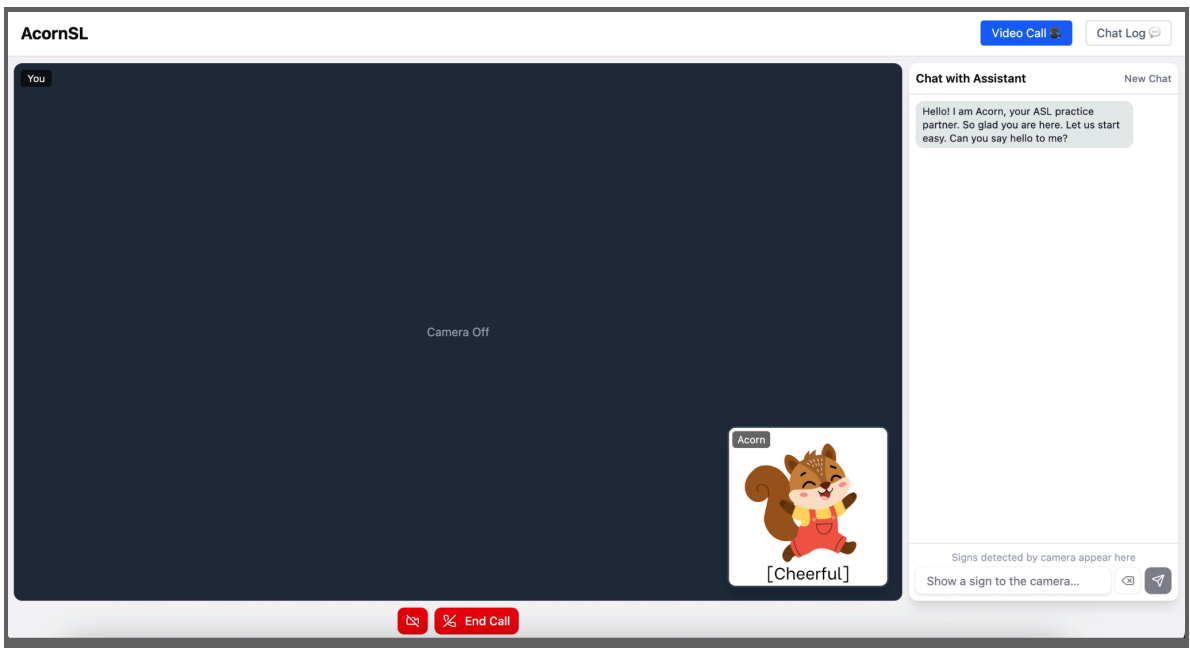
An overview of our project
Provide details about your project
- AcornSL is a browser-based American Sign Language (ASL) learning tool powered by on-device AI.
- Our motivation: learning ASL should be low-pressure, free, and accessible to anyone with a laptop. Users don’t need to find a tutor or sign up for a class, since everything runs locally on their device and no data ever leaves the browser.
- At the heart of AcornSL is an expressive squirrel character who guides learners through real conversations using the Socratic method: asking questions, providing corrections, and keeping the dialogue going naturally.
- A computer vision model detects and translates the user’s hand signs in real time, feeding directly into the chat. An on-device LLM then validates ASL grammar, corrects errors with clear explanations, and responds conversationally in English.
- The result is a learn-by-doing experience: users practice ASL, receive immediate feedback, and build confidence through interaction. Because all inference runs on-device via WebGPU, AcornSL is both fast and private.
- Finally, our project was inspired by the concept of different representations as presented in the CaMeRa paper.
Talk a bit about your audience
- Our audience would likely be ASL beginners seeking a more interactive, affordable way to learn without a partner. This includes hearing individuals learning ASL to communicate with deaf or hard-of-hearing people, as well as students in introductory ASL courses who want to practice outside the classroom on their own schedule and at their own pace.
What does your artifact do?
- Real-time sign detection: the webcam recognizes ASL hand signs and pastes them as gloss directly into the chat box.
- ASL grammar correction: Acorn validates gloss against ASL rules and explains grammar errors.
- Conversational practice: Acorn responds naturally in English, keeping the dialogue going using the Socratic method.
- Emotional feedback: Acorn’s expression updates dynamically to humanize the learning experience.
- Chat log: the full conversation history is saved locally on the device for review.
- Privacy: all inference runs on-device.
- Users can learn ASL vocabulary, sentence structure, and grammatical rules unique to ASL and build confidence through low-pressure conversational practice.
What are the fun and/or interactive aspects of your app?
- Acorn is an expressive squirrel who switches reactions among cheerful, confused, embarrassed, encouraged, focused, and surprised expressions based on the user’s message.
- The interface mimics a video call, with the user’s webcam on screen and Acorn in the bottom right corner, making practice feel natural and intimate.
- Real-time sign detection means users sign with their hands and learn by doing.
- Grammar corrections appear as friendly notes, keeping the experience encouraging.
- The Socratic method and follow-up questions from Acorn keep the conversation flowing and keep ASL practice going.
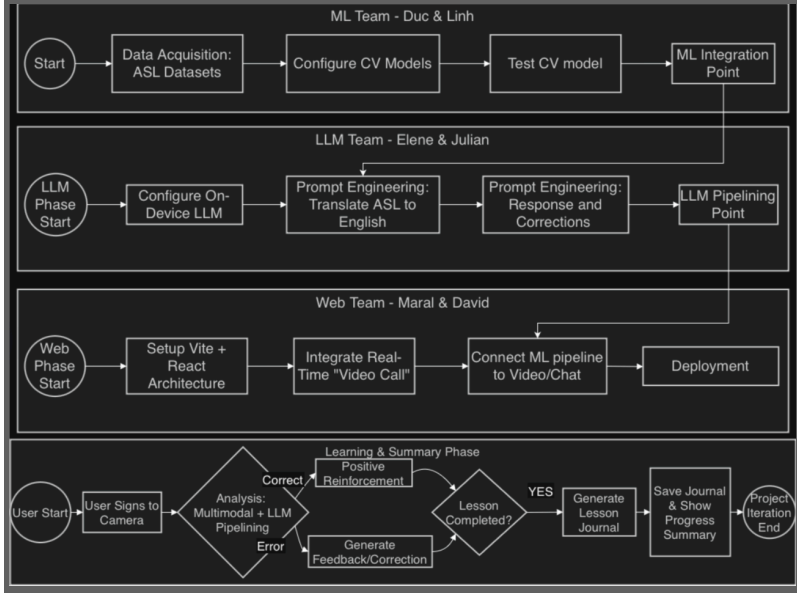
Our Process
Describe your process to design and develop your project.
- Besides the Scrum Master, who coordinated meetings, and the Product Manager, who managed documentation, our group of six split into three focused teams for more manageable collaboration.
- On-Device LLM Team researched AI models from Hugging Face and inference-on-web libraries, integrated the LLM into the website, designed the multi-pipeline architecture, and iteratively prompt-engineered for more robust and consistent responses.
- The Computer Vision Team built the sign language recognition and classification system using MediaPipe for landmark extraction and Dynamic Time Warping for sign matching, and created the sign-map database. They packaged the final model as a library to be brought over to the website.
- The website team handled UI creation and connected the computer vision pipeline and the LLM conversation, ensuring both systems worked together smoothly within the React application.
Talk about your challenges and achievements.
- Sign language recognition was the first major obstacle. We initially explored fine-tuning existing models but found that available datasets were either too limited in vocabulary or only covered static letter signs rather than dynamic whole-word signs.
- We pivoted to Dynamic Time Warping using landmarks extracted with MediaPipe, which gave us the flexibility to build and expand our own sign-map database.
- Working with an extremely small on-device LLM model presented a different set of challenges. To get reliable grammar correction from a sub-1B parameter model, we designed a multi-pipeline architecture by breaking ASL gloss into tokens, detecting and correcting errors per token, and running a final response pipeline. Achieving consistent JSON output and rule-following behavior from such a small model required extensive prompt engineering iteration.
- We also used WebGPU to bring inference latency down to an acceptable level for a conversational interface.
Achievements
- Fully on-device inference: user data doesn’t leave the browser, and the model works offline after initial load.
- Real-time ASL sign detection integrated directly into the chat input.
- A four-pipeline LLM architecture that separates grammar correction from conversational response.
- An emotion-driven character that reacts dynamically to users’ messages.
- WebGPU acceleration prodividing acceptable response time on compatible hardware.
- A session summary feature that gives users actionable feedback after each practice session.
Future work.
- Expand the sign-map database to cover a significantly larger ASL vocabulary.
- Expand to more sign languages beyond American Sign Language
– Build a native mobile app for better model caching, smoother performance, and offline support. - Fine-tune the LLM for more accurate grammar correction
– AI-assisted personalized learning plans that adapt to each user’s progress and target their weak areas. - Sign video references so when Acorn mentions a sign, users can see a short demonstration of how to perform it.
(Disclaimer: As students learning to develop technologies through a humanity-centered design approach, we recognize that unforeseen issues may arise despite our intentions and best efforts.)
Acknowledgments and References
We would like to express our sincerest thanks to Professor Fernanda Elliot, who acted as our client for this project and provided invaluable weekly feedback. We would also like to thank Martin Pollack ’22 for his technical advice on computer vision and LLM integration, and Lilly Neily for her support with sign language data and user feedback.
Packages, datasets, and any resources used to build your app:
- Qwen3.5-0.8B model via Hugging Face and the ONNX Community
- Transformers.js by Hugging Face for in-browser LLM inference
- MediaPipe by Google for hand landmark extraction
- ONNX Runtime Web for WebGPU-accelerated model inference
- React + Vite for the web application framework
- Tailwind CSS and shadcn/ui for UI components
- Figma for wireframing and design prototyping
Disclaimers
Educational & Research Prototype: This tool is a research prototype developed for educational experimentation. It is not a certified language proficiency assessment tool. American Sign Language (ASL) is a complex, nuanced language that involves facial expressions and body movements not fully captured by this interface.
Community Disclaimer: We acknowledge that language learning is best achieved through interaction with the Deaf community and certified instructors. This tool should be used as a supplementary practice aid, not as a primary source of ASL instruction.
Privacy & Camera Usage: This application requires camera access to function. All image processing is performed locally in your browser. No video or image data is transmitted to or stored on our servers.
Limitations of AI: The underlying AI models may have limitations regarding hand positioning, lighting, and skin tone diversity. Future work should improve the robustness and inclusivity of our recognition patterns.
Educational Scope: This page documents a student-led prototype developed within the CSC324 course at Grinnell College. Consistent with our pedagogical philosophy, this project is a research and learning artifact, not a commercial product. The findings and technical implementations reflect the students’ learning process at the time of the project’s conclusion and may contain the limitations typical of experimental academic prototypes.
