
Project Title: HumorVision, by Team Abstraction
Skills: Full-Stack Web Development, API Integration & Prompt Engineering, Asynchronous Backend Design, Browser Extension Development, Agile Project Management.
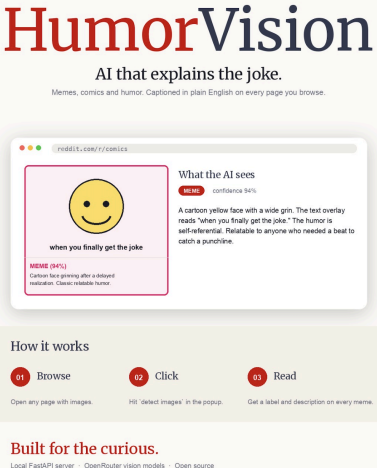
Project Summary
- HumorVision is a Chrome extension with a local Python server that helps people with print disabilities access memes on web pages. It first scans visible images and sends them to a FastAPI backend. Then it will display plain-language captions that describe the image, transcribe visible text, and, when possible, explain the joke.
- The interface keeps interaction simple: users click one popup link to detect images, then they will see readable captions with clear meme/non-meme labels. The project was built collaboratively using GitHub version control and weekly sprints.
What is your project about?
- HumorVision is a Chrome Extension aimed to help people with print disabilities access images online, especially memes. It will scan the web page for images, analyze them with AI, and output a description of each image.
What are the core aspects of your project?
- A Frontend Chrome Extension: Built with Manifest V3.
- This involves a simple user interface that is simple with just one button to turn it on.
- It will then put a description under the image along with a
function to read the text out loud.
- A FastAPI Backend
- OpenRouter API is used to analyze images and output text
description.
- OpenRouter API is used to analyze images and output text
What are the goals/vision for this project?
- Our goal is to get rid of the visual wall that stops people with
print disabilities from being able to access different visual
information online.
What drove your design choices?
- We wanted a simple user interface that is very easy to use.
- We wanted to keep the user interface private by using a local
server for the detected image cache. - We did not want to waste users’ time, so we immediately said
whether the image is a meme.
What does your project do? What was your client hoping to get out of it?
- Our product gives the user a text or audio description of images
online. The potential users would be people in the accessibility
community with print disabilities, and this product seeks to provide a visual description that is easier to get and more in-depth than existing services.
What are the project requirements? How did you address the requirements?
- We picked images larger than 200×200 pixels to focus on more relevant visual content.
- We chose OpenRouter for the best AI image analysis.
- We made our product as accessible as we can make it by creating
a Chrome extension.
Future work. If you were to continue this project, what would be the next steps?
- Having it on the Chrome Web Store.
- Users can decide how much information/context they want from the meme.
- Users would want a more descriptive image than someone who just wants to know what a meme means.
Show and describe your process to design and develop your project.
We were thinking of creating a product that will be inclusive and
help people in need. We thought of a meme generation AI, but
there were problems with that, so we instead decided to create a
meme analysis AI.
Talk about your challenges and achievements.
Picking the right images and highlighting them so the user could select them was a huge hurdle to code. Prompting the AI to identify which image is a meme and provide a concise yet appropriate description was difficult, but we pulled it off by the end.
(Disclaimer: As students learning to develop technologies through a humanity-centered design approach, we recognize that unforeseen issues may arise despite our intentions and best efforts.)
Acknowledgments and References
Thanks to Vivero Fellow Chloe Kelly ‘26, CLS Sasha Grigorovich.
Paper: Connotation and 3D Modeling from Limited, Raw Textual Descriptions. Berman, Noda, Shermak, Ye, Rothfusz, Chen, Leungpathomaram, Shibue, Liu, and Eliott.
Academic Purpose: HumorVision is a research prototype. The classifications provided are based on automated models and do not represent our personal opinions or judgments.
Subjectivity & Accuracy: Detection of humor and sentiment is inherently subjective and context-dependent. The tool may produce false positives or misclassify comments.
Content Warning: As this tool analyzes real-world data from public repositories, users may encounter comments that include informal language or expressions of frustration. HumorVision does not endorse or validate the content of the comments analyzed. Finally, our analysis is conducted on publicly available datasets.
Educational Scope: This page documents a student-led prototype developed within the CSC324 course at Grinnell College. Consistent with our pedagogical philosophy, this project is a research and learning artifact, not a commercial product. The findings and technical implementations reflect the students’ learning process at the time of the project’s conclusion and may contain the limitations typical of experimental academic prototypes.
